Open to work · Remote worldwide

MD Samiul Alam Sumel I build systems that take manual work off your team. Web Developer · Business Systems & Workflow Automation

AI-Assisted Product Builder

Billing, tracking, reports and approvals that run on their own, from a full-stack web developer with 12+ years doing the work by hand inside a national seaport.

Done by hand / email / spreadsheet ? I'll turn it into a system.

  • 12+years in port operations
  • 3systems in daily use
  • 8+live deployments

What do you need built?

Advance bills, calculated in one place.

Rotation + vehicles → Slabs · VAT · levy → Advance bill

Before
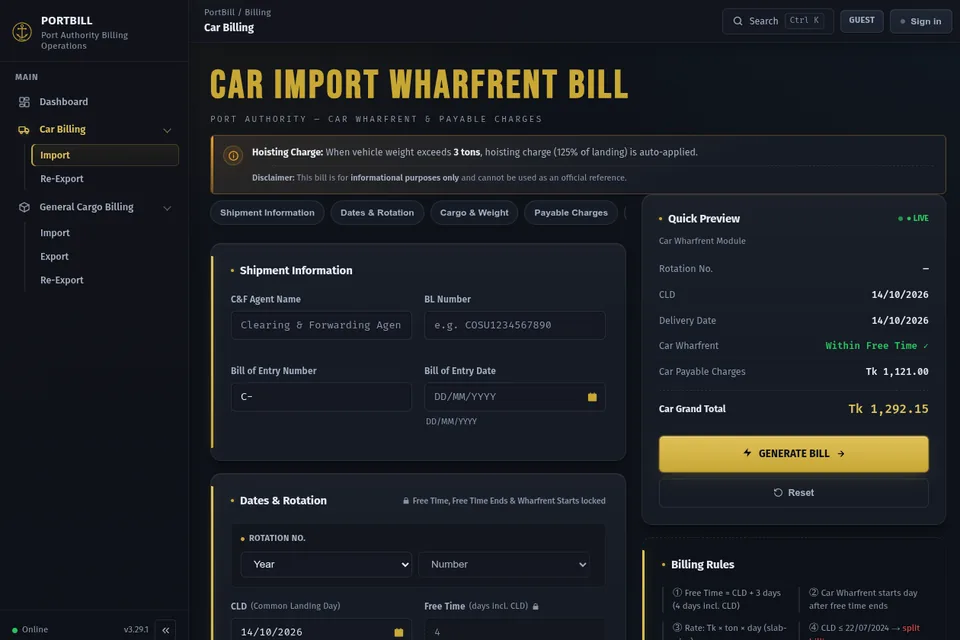
C&F agents, importers and shipping agents kept asking what the bill would be. Revenue staff worked each one out by hand or in Excel.
After
One calculator applies the port’s own rules (wharf rent, VAT, levy) in a fixed order, so the advance bill comes from one place.

Live · daily use Port Billing System: case study →

One online record everyone can see.

Daily counts → Balances by location → Reports + history

Before
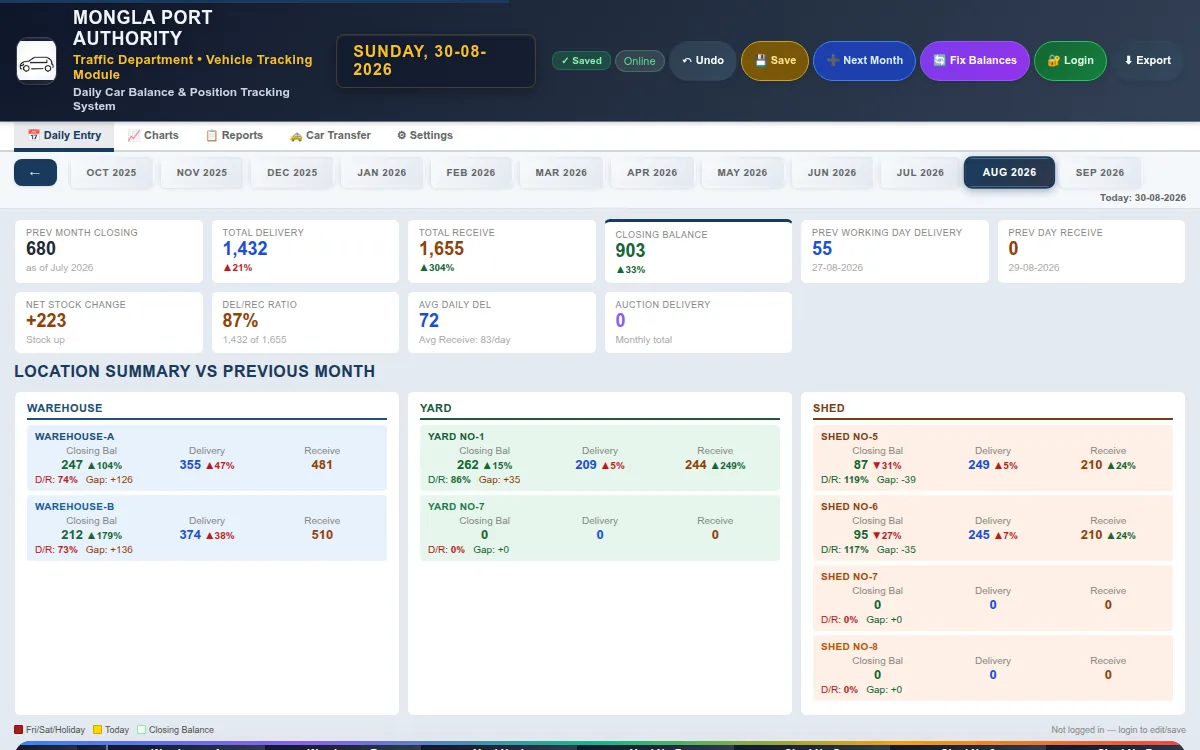
Daily vehicle receipts, deliveries and balances kept in an Excel file that only one person could see.
After
Now online: everyone concerned sees the same daily balances per location, with reports and a change history. It works offline too.

Live · daily use CarView: case study →

Overtime bills, prepared automatically.

Employee + hours → Rate rule → A4 bill

Before
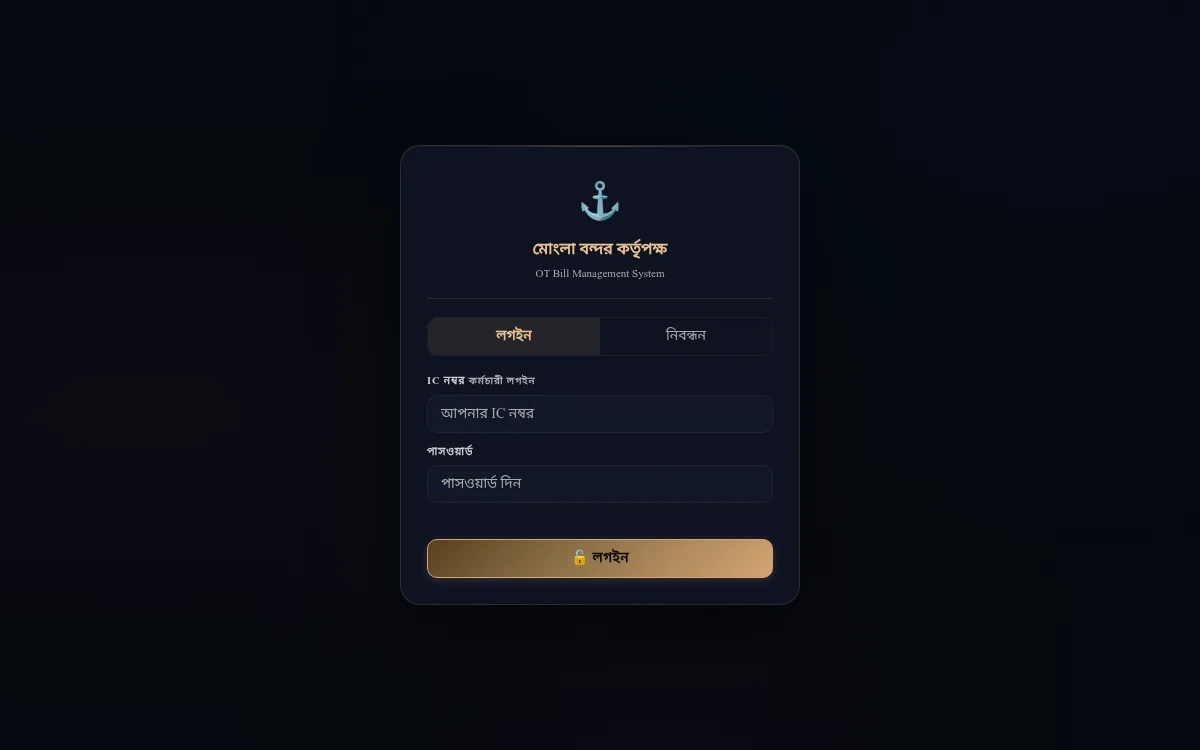
Overtime bills prepared on paper.
After
Bills are prepared from employee profiles and daily hours. The rate rule applies automatically.

Live · daily use OT Bill Automation: case study →

From idea to a live web app.

Your process → Built and deployed → A link your team opens

Before
A tool or site that exists only as an idea, or as a file nobody else can open.
After
A deployed web app anyone on the team opens from a link.

Live World Kitchen Atlas → OpsFlow (in development) →

Manual work, automated

Three manual processes, now working systems.

Each one replaced work that was done by hand at a seaport. The same problems exist in any business that runs on spreadsheets.

#1 · Flagship production system

Billing automation × Rate tables

Port Billing System

Agents and importers ask what their bill will be. Revenue staff worked each one out by hand or in Excel.

One calculator applies the port’s wharf rent, VAT and levy rules in a fixed order.

Live · daily use
#2 · Operational tracking system

Transport operations × Tracking

Vehicle Tracking / CarView

Daily vehicle receipts, deliveries and balances lived in one Excel file.

Everyone concerned now sees the same online record for each location, with reports and a change history. It works offline.

Live · daily use

#3 · Workflow automation system

Operational administration × Billing

OT Bill Management / Automation

Overtime bills were prepared on paper.

The system prepares them from employee profiles and daily hours, applies the rate rule automatically and prints on A4.

Live · daily use

Other engineering work

Smaller and newer builds, taken from my GitHub. Each is labelled live or source only. None carries the daily-use status of the three systems above.

All repositories on GitHub ↗

Next: Experience

Professional experience

12+ Years of Hands‑On Operations Experience

Hands-on work in billing, reports, tracking, records and teamwork at a national seaport, and how that work became software.

Traffic Department · November 2013 — Present

Mongla Port Authority

  • Junior Outdoor Assistant, Port & Terminal Operations

    Nov 2013 — Nov 2017
  • Senior Outdoor Assistant, Traffic Department (Revenue Branch)

    Nov 2017 — Present

I support port traffic work. This covers cargo, containers, vehicles, billing, reports, records, revenue tasks and working with other parties.

Operational areas

Port operations

Cargo operations

  • Cargo movement and cargo handling records.
  • Cargo dwell-time monitoring across terminal locations.
  • General cargo: non-containerized cargo, handled and billed alongside vehicles.
  • Operational documentation for cargo movements.

Container workflows

  • Container tallying.
  • Containerized cargo delivery workflows.
  • Container statistics reporting.
  • Stuffing, delivery and shipping bill workflows.

Vehicle operations

  • Vehicle delivery workflows and vehicle-related daily records.
  • Vehicle and cargo position tracking across warehouse, shed and yard.
  • Car import and delivery statistics, and vehicle balance records.
  • Customs-related vehicle reporting, including auction vehicles.

Billing and commercial operations

  • Wharf-rent (port facility usage charge) billing: slab-wise charge calculation, VAT and levy, and the inside / outside cargo split.
  • Vehicle, general cargo, and stuffing, delivery and shipping-related billing; demurrage.
  • Advance billing estimates and billing records.
  • Applies the port’s published tariff; does not set tariff policy.

Revenue and operational reporting

  • Daily and monthly revenue reports and cumulative income statements.
  • Monthly Traffic Department reporting for port authority management.
  • Container, cargo, vehicle and jetty statistics.
  • Excel-based data preparation and record checking.

Documentation and administrative workflows

  • Operational and billing documentation, and reports.
  • Bank-deposit (challan) workflow and monthly statements.
  • Customs-related reporting.
  • Operational records.

Operational coordination

  • Customs & freight-forwarding (C&F) agents: paperwork, billing queries and advance payment planning.
  • Shipping agents and stevedoring stakeholders.
  • Customs-related stakeholders and port authority management.
  • I coordinate only. I have no authority over outside bodies.

Data and reporting

  • Turning daily records into structured, recurring reports.
  • Running totals and monthly figures stay consistent across billing, vehicle balances and statistics.
  • Record checking before figures are reported.

Process automation

  • Repeated calculation and report steps I found while doing the work.
  • First structured in Excel, then rebuilt as small web tools.
  • Result: the Port Billing System, CarView and OT Bill Automation, plus OpsFlow as a product project.

From operational work to automation

Nov 2013 Joined Mongla Port Authority

  1. Manual operational work

    Daily billing, tallying and reporting done by hand, with the port’s own systems and paper.

  2. Excel records and automation

    Personal and shared spreadsheets for daily figures, then formulas that remove repeated calculation and report steps.

  3. Process analysis

    Writing the workflow and rules down before automating any of it.

  4. Internal tools and web apps

    Small purpose-built calculators, rebuilt as installable web apps other staff can use.

  5. Business systems

    Connected records, roles and reports: billing, tracking and overtime bills.

  6. AI-assisted product development

    Using AI tools to build faster, while I own requirements, rules and validation. OpsFlow is the product project.

Present Building operations technology

The software work grew out of daily work problems. Milestones are shown without dates because only the employment period is exact.

Next: How I build

How I build

From Operational Problems to Working Systems

I start with the real workflow, identify where time, data or accuracy is being lost, model the process, and build practical software around it.

Observe the Operation

Understand the real workflow first. The questions come before any software.

  • Who performs the work?The people who do it today, and where.
  • What information do they use?Documents, records and spreadsheets.
  • What gets repeated?Steps done again for every bill, day or record.
  • Where do errors occur?Manual calculation, copying and missed cases.
  • What depends on Excel, paper or messages?The parts a system could take over.
  1. People
  2. Process
  3. Data
  4. Documents

Define the Requirement

Turn the work problem into a clear software requirement.

  • Users
  • Inputs
  • Outputs
  • Workflow states
  • Exceptions
  • Constraints
  • Reporting requirements
  1. Input
  2. Process
  3. Decision
  4. Output
  • Cargo → Calculation → Billing → Report
  • Vehicle → Delivery → Charges → Balance
  • Order → Trip → Invoice → Payment the workflow OpsFlow is being built around

Model the Workflow

Convert the workflow into rules and structures a system can follow. The rules are written down before any code, because software cannot guess them.

  • Business rules
  • Calculations
  • Entities
  • Relationships
  • Validation rules
  • User flows
  1. Business process
  2. Workflow
  3. Business rules
  4. Data model
  5. System requirements

Design the System

Pick the architecture, data model, interface, hosting and tools that fit the need. The tools follow the operation, not the other way round.

  1. User interface
  2. Application logic
  3. Database
  4. Reports / outputs
  • Forms
  • Validation
  • Calculations
  • Dashboards
  • Search / filter
  • Reporting
  • User roles
  • Audit / history where applicable

Sized to the problem: a calculator that only estimates needs no database, while shared records need a data store and a small API.

Build with AI-Assisted Development

AI is an implementation accelerator, not the source of domain knowledge. It speeds up the work once the requirement and the rules are clear.

  1. Requirements
  2. Architecture
  3. AI-assisted implementation
  4. Code review / inspection
  5. Testing
  6. Iteration
  • Requirement interpretation
  • Business logic
  • Architecture decisions
  • Code review
  • Testing
  • Debugging
  • Validation
  • Deployment

Validate Against the Real Workflow

A system is only useful when it behaves like the process it supports.

  • Business rulesDo calculations follow the rules as written?
  • Edge casesWhat happens when data is incomplete, duplicated or unusual?
  • Known scenariosDo results match cases the desk already knows?
  • Invalid inputIs bad or missing data rejected clearly?
  • Calculation resultsChecked against known or manual results where possible.
  • User workflowCan users finish the task in the real order?

In the port billing calculator, the slab, VAT and rounding rules are covered by automated tests and were compared against real bills.

Ship & Improve

Deploy the working system, watch how it is used, and keep improving it from real feedback.

  1. Deploy
  2. Use
  3. Feedback
  4. Problems found
  5. Improve
  6. Repeat

The live tools run as installable web apps on Cloudflare Pages and Workers, with code versioned on GitHub. Read two real bug fixes, in full ↗

A Real Example of the Approach

The stages above, applied to two systems in daily use. No real records or figures are shown.

  1. Observe

    C&F agents, importers and shipping agents kept asking what a bill would be. The port’s billing system makes permanent entries, so they could not check wharf rent before committing, and revenue staff worked each estimate out by hand or in Excel. The result was billing disputes, longer cargo dwell time and repeat trips to the counter.

  2. Define

    Check wharf rent and the other charges before submitting, with no permanent entry, and print the bill on A4.

  3. Model

    Free time, wharf-rent slabs, VAT and levy, inside and outside storage, and rate changes mid-storage, written down as rules before any code.

  4. Design

    Structured forms, saved bills with live search and a dashboard. The rules run as plain JavaScript in the browser, so the estimate appears at once and works offline. Agents still work from paper.

  5. Build

    AI-assisted implementation. Requirements, business logic and review stay with me.

  6. Validate

    The slab, VAT and rounding rules are covered by automated tests and were compared against real bills.

  7. Ship

    Staff use it at the billing counter to check charges before they submit.

    Live · daily use Port Billing case study →

  1. Observe

    Vehicle positions across warehouse, shed and yard lived in one person’s Excel file. When they were away, the team lost visibility.

  2. Define

    Record daily receipts and deliveries for each location, keep a full history, and work offline because terminal connectivity is not guaranteed.

  3. Model

    Each location’s closing balance becomes the next day’s opening balance. Receipts, deliveries and transfers adjust it, and a holiday calendar sets the working days.

  4. Design

    An installable web app with a Cloudflare Worker. Every save is a version-controlled commit, so any earlier version can be restored. Charts, reports and Excel export are included.

  5. Ship

    The whole department checks and updates the same record, replacing a single-person file.

    Live · daily use CarView case study →

My software work is self-directed and AI-assisted. Its foundation is 12+ years of real operations experience, workflow design, testing and practical system building.

Engineering decisions

Engineering Decisions

Good engineering does not mean the most complex tools. It means the right solution for the real limits.

Decision 1 · Port Billing

Business logic in the browser

Problem
Billing needed deterministic calculations from the port’s tariff and operational rules.
Decision
Run the rules as plain JavaScript in the browser.
Why
The estimate appears immediately and works offline, with no backend infrastructure for the calculation itself. Only saved bills sync, through a small Cloudflare Worker.
Trade-off
Right for this calculation workflow. If the need grew to centralised transactional records, complex multi-user workflows or server-side audit, the architecture would need reconsidering.

Decision 2 · CarView

PWA, Worker and GitHub-backed data

Problem
A departmental workflow needed shared, structured records and controlled changes.
Decision
An installable web app with a Cloudflare Worker and GitHub-backed data.
Why
Simple deployment, version history, controlled writes and a lightweight architecture suited this one workflow.
Trade-off
Not a universal database architecture. A higher-volume transactional system would normally call for a conventional database.

My engineering principle

Design around the workflow, not around the technology.

I choose technology based on:

  1. Operational constraints
  2. Workflow complexity
  3. Data requirements
  4. User needs
  5. Maintainability
  6. Deployment simplicity
  7. Future requirements

Next: OpsFlow

Product case study · Building

OpsFlow In development

One connected system for small and mid-sized transport and logistics firms.

From customer orders to trips, invoices, payments and outstanding balances, OpsFlow connects the workflow in one place. Built to help small and mid-sized businesses replace scattered Excel, WhatsApp and manual records.

Implemented: tenant-isolated accounts and roles, customer, route and rate-card data, fleet records and quotations. In development: orders and trips. Planned: invoices, payments, outstanding balances and reports.

TypeScript · React · Cloudflare Workers + D1

Concept · synthetic demonstration data. There is no dashboard in the current build yet.

Customer

Implemented

Keep the customer data used at every step.

Connects to
Quotation (implemented) → Order → Invoice → Payment → Outstanding

Order

In development

Capture what the customer requested, so operations start from one agreed record.

Connects to
Customer and Quotation → Trip / Operation

Trip

In development

Show how an order is really carried out.

Connects to
Order → Vehicle and Driver → Invoice

Invoice

Planned

Turn finished work into a billing record.

Connects to
Trip → Payment → Outstanding

Payment

Planned

Record payment received against business receivables.

Connects to
Invoice → Outstanding

Outstanding

Planned

Give visibility into unpaid balances.

Connects to
Invoices and Payments → Reports

Reports

Planned

Turn connected daily data into business facts.

Connects to
Everything upstream

Questions

Frequently asked questions

Who is Samiul Alam Sumel?

I am a web developer who builds business systems and internal tools, with 12+ years of operations experience at Mongla Port Authority in Bangladesh. I turn manual work into web systems that teams use every day.

What kind of work do you automate?

Work a team does by hand, such as spreadsheets, paper forms and hand calculations. I turn it into a web system with the same rules built in.

What systems have you built?

Three are in daily use: a port billing calculator, a vehicle quantity tracker and an overtime billing tool. More than 8 web applications are live in total.

Can you build software for industries other than ports?

Yes. The method is the same in any business: map how the work really runs, write the rules down, then build and test the system. Port work taught me billing, tracking and reporting. Other builds on this site are not port work: a content site, a commerce platform, a sales-outreach tool and a course platform. In a new industry I start by learning how your work runs, and I do not claim your domain knowledge.

Are you open to remote or contract work?

Yes. I am open to remote work worldwide, including contract projects. Email sa.sumel91@gmail.com to start a conversation.

How fast and accessible is this website?

In local Lighthouse tests on 14 October 2026, ten pages (the homepage, About, Experience, Resume, Capabilities, Engineering, Privacy and three case studies) scored 100/100 for accessibility, best practices and SEO. Homepage desktop performance scored 100/100 and mobile performance on those pages scored 92 to 98.

Contact

Let's Build Better Operations

If your team runs on spreadsheets, paper or manual steps, in any industry, and you have a process worth automating, I'd be interested in discussing it.

Open to international and remote opportunities Based in Mongla, Bangladesh (UTC+6). Web development · Business systems & workflow automation · AI-assisted product building

Start a conversation

Choose what it is about. Click Email for a detailed message, or Phone / WhatsApp for a short one. Both open with the text already written.

What is this about?

Nothing is sent from this page. Your own WhatsApp or email app opens with the text filled in.

Elsewhere

Connect on LinkedIn
linkedin.com/in/samiul-alam-sumel
View GitHub
github.com/samiulAsumel
Port Billing App (Live)
portbill.pages.dev

Choose a CV

Same facts, framed for two kinds of role

  • Operations & systemsGlobal Operations & Systems CV Best for operations, process automation, business systems and logistics roles. PDF DOCX
  • Remote / contractProduct Building CV Best for product and full-stack product work, business systems, workflow automation and remote or contract roles. PDF DOCX